COMETCON
NOV 8, 2025
The Real Impact of Encryption on Cloud Backup Speed
Discover how AI-driven forecasting in Comet Backup helps MSPs prevent data loss before it happens.
Your decision to go for Comet-Hosted or self-hosted backup management starts with asking yourself one question:
Where should the backup console live?
For MSPs and IT teams that would rather keep another application server out of the stack, Comet-Hosted is the cleaner call.
Comet Backup handles the console environment, while your team continues to run the key components: protected devices, schedules, retention rules, storage destinations, and recoveries.
Other teams need the console closer to their own environment. It might be because of customer agreements, internal review processes, storage rules, network controls, and compliance checks. For them, Self-Hosted gives more room to manage the setup on their own terms.
Comet Backup supports both because backup teams rarely make decisions from a linear checklist. They make them from actual constraints:
Let’s help you make the right choice.
Comet-Hosted and Self-Hosted are two ways to run backup management. The job is the same with only the ownership changing.
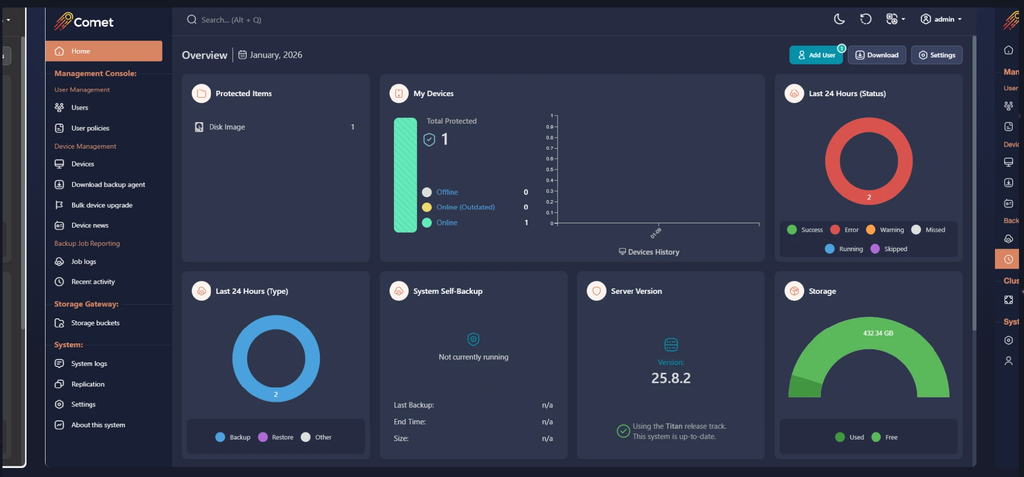
Source – Alt- text: Comet Backup Self-Hosted Management Console
Comet-Hosted works well when the team wants the management console ready to use and maintained by Comet Backup. MSPs and IT teams still manage backup jobs, users, schedules, storage destinations, and backups. They just avoid running the console infrastructure themselves.
Ask this: Are we choosing Self-Hosted for a real requirement, or because we usually host everything ourselves?
Self-Hosted makes sense when the console needs to run inside your own infrastructure, private cloud, or customer-approved environment. This is common when access control, client commitments, network rules, or internal review processes require a setup your team can inspect and manage directly.
Ask this: Who needs to approve the console location, and what proof will they expect?
Comet-Hosted is a strong fit when your team wants hosted management, cloud storage, and a lighter infrastructure footprint. Self-hosted backup management is better when backups need to stay in specific environments, such as on-premise storage, private cloud infrastructure, client-mandated locations, or retention policies your team manages directly. Storage requirements often narrow the choice before the feature list does.
Ask this: Where must backup data live, and who needs to verify that?
With Comet-Hosted, Comet Backup manages the management console infrastructure. With Self-Hosted, your team runs that layer. That gives you more direct control, but it also adds responsibility for monitoring, updates, access, and troubleshooting. Choose the model your team can support on a normal workday.
Ask this: Where must backup data live, and who needs to verify that?
Self-Hosted is the stronger fit when teams need granular admin permissions, audit logs, IP rules, tenant account structure, API access, and replication. These controls matter most during audits, client reviews, security checks, and change-control conversations.
Ask this: Which controls are required for audits, customer reviews, and internal security approval?
Moving from Self-Hosted to Comet-Hosted means reviewing users, policies, device connection URLs, branding, code signing, and storage vaults before cutover. Devices need a clear route to the new console, and your team should not be fixing branding or signing issues after the move.
Ask this: What happens to devices that are offline during the migration?
A 2026 Veeam report found that only 28% of organisations hit by ransomware fully recovered all affected data. For MSPs and IT teams, this makes backup management a proof point. The chosen setup should make it easier to show where systems are managed, how restores are tested, and who owns the recovery process.
Read more: World Backup Day 2026: Backup Best Practices for MSPs and IT Teams
Ask this: Can we prove recovery readiness, or are we just assuming it?
Before choosing, assign owners for four things: console health, update windows, access approvals, and restore testing.
If those jobs need to stay inside your team, Self-Hosted gives you the right operating model.
If your team mainly needs backup oversight and faster rollout, Comet-Hosted keeps the management layer lighter.
In the end, the best model is the one your team can support during onboarding, audits, and recovery testing.
1. What is self-hosted backup management?
Self-hosted backup management means your team runs the backup management console on infrastructure you control. It is often used by MSPs and IT teams that need closer control over access, storage location, network rules, customer requirements, or compliance reviews.
2. Is Comet-Hosted or Self-Hosted better for MSPs?
Comet-Hosted suits MSPs that want faster setup and less console infrastructure to maintain. Self-Hosted suits MSPs managing customers with stricter access rules, private infrastructure needs, audit requirements, tenant structures, API usage, or storage controls.
3. Does cloud backup software mean all backups live in the cloud?
No. Cloud backup software can refer to the management layer, the storage destination, or both. Comet-Hosted manages the management console, while storage options depend on the setup. Self-Hosted gives teams more control when data needs to remain in specific environments.
4. When should a team choose self-hosted server backup software?
Teams should choose self-hosted server backup software when they need direct control over the console, storage routes, admin permissions, audit visibility, IP rules, or private infrastructure. It is also useful when customer contracts define where systems and data must be managed.
5. How does pricing differ between Comet-Hosted and Self-Hosted backup management?
Pricing depends on the hosting model, protected devices, storage setup, and internal maintenance effort. When comparing backup server costs, backup-as-a-service pricing, or online server backup pricing, include staff time, update planning, infrastructure upkeep, support workload, and restore testing.
Discover how AI-driven forecasting in Comet Backup helps MSPs prevent data loss before it happens.
Discover how AI-driven forecasting in Comet Backup helps MSPs prevent data loss before it happens.
Discover how AI-driven forecasting in Comet Backup helps MSPs prevent data loss before it happens.
Discover how AI-driven forecasting in Comet Backup helps MSPs prevent data loss before it happens.
Discover how AI-driven forecasting in Comet Backup helps MSPs prevent data loss before it happens.
Discover how AI-driven forecasting in Comet Backup helps MSPs prevent data loss before it happens.